DaTuner: Tuner & Metronome
- 4.2
- Rating
- 10.00M
- Installs
- Free
- Price
 Analysis by App-foxy
I have always liked tools that solve one small problem without making me work through a complicated setup, and DaTuner fits that idea well. It is a music and audio app from Prometheus Interactive LLC that turns an Android phone into a chromatic tuner and metronome for instruments such as guitar, bass, violin, ukulele, and banjo. I used it with the practical expectation that a phone microphone is not a dedicated pedal or clip-on tuner, and that distinction matters: the app is especially useful when I need a quick reading, while a more controlled hardware setup remains preferable for loud rehearsals or performances.
The app is free to install, carries an Everyone age rating, and has built a substantial audience, with more than ten million installs and an average score of 4.2 from roughly four hundred fifty-four thousand ratings. Those figures suggest that it has become a familiar utility rather than a niche experiment. Its current release is version 3.7.8, and it works on Android devices beginning with Android 5.0. Optional purchases range from under a dollar to around one hundred dollars per item, so I would pay attention to any purchase screen rather than assuming every extra is included in the free experience.
How DaTuner behaves when your phone is connected, moving, or interrupted
When my phone is connected to other devices, being moved around, or interrupted by a notification or call, I treat DaTuner as a quick check rather than something to leave running unattended. I try to settle the phone near the instrument and finish tuning before shifting to another task; that simple handoff keeps placement and attention from becoming extra variables. Next, I look at what happens when the room or the phone itself makes that focused routine harder.
You May Also Like

 Blood Strike: 2.5 Anniversary
Blood Strike’s Loadouts Turn Every Drop Into a Tactical Gamble
A close look at Blood Strike’s custom loadouts: how fast access to signature weapons reshapes its battle royale rhythm, rewards preparation, and narrows the gap between fights.

 Pandora - Music & Podcasts
Pandora’s Music Is Easy to Start, but Harder to Recover
Pandora’s strength is its low-effort path from a seed to a station. Its weak spot is how much confidence it asks you to place in connection, setup, and quiet recovery.

 8 Ball Pool
 Is Built on Rivalries, Rematches, and Routine
A close look at the rivalries, rematches, shared routines, and unanswered safety questions that turn a quick pool match into a persistent mobile community.

 Samsung Music
’s Quiet Strength Is Playing What You Already Own
Its reach comes less from spectacle than from dependable access to a personal library. That simplicity is both the app’s strongest retention engine and its ceiling.

 AccuWeather: Weather Radar
AccuWeather Review: A Quick, Clear Forecast for Everyday Decisions
For everyday plans, the best forecast is the one you can understand quickly. AccuWeather makes rain timing, radar, and local conditions easy to act on, with a few trade-offs.

 Hill Climb Racing
Why Hill Climb Racing Still Turns Crashes Into One More Run
A tiny car, a bumpy hill and one more upgrade: Hill Climb Racing keeps resurfacing because its simple chaos makes every near-miss feel personal.
More From Our News Desk
View All News


A tuner that makes the phone microphone the main connection
The most important connection in DaTuner is not between the app and an online account. It is between the instrument, the phone microphone, and the surrounding room. That sounds obvious, but it changes how I use the app. When I play one string close to the phone in a quiet room, the tuner can focus on the note much more easily than when I place the phone beside a television, a conversation, or another instrument. The app is therefore convenient, but it is not magically isolated from its environment.
This is where a chromatic tuner is useful. Instead of limiting me to a narrow list of preset instruments, it listens for the pitch that is actually being played. I can use it for a standard guitar check, then switch to a bass, violin, ukulele, or banjo without carrying separate tuning tools. That flexibility is one of the strongest reasons to keep it installed. It is also helpful for instruments that do not fit neatly into the presets offered by simpler guitar-focused tuners.
I found the best workflow was to tune one string at a time, mute the others, and let the note ring long enough for the display to settle. Plucking repeatedly and immediately turning the peg can create a misleading impression because the first attack of a note may not represent the pitch that remains after the string stabilizes. A short pause between adjustments gives the app a cleaner signal and reduces the temptation to chase a moving reading.
What changes when connectivity is part of the situation
For everyday tuning, my attention is usually on the microphone rather than on network activity. That makes DaTuner feel practical in places where I want to prepare an instrument quickly: a bedroom, a classroom before a lesson, a rehearsal room, or backstage while waiting for a setup. I would still avoid treating a phone tuner as a guaranteed solution in every connected environment. A weak or busy phone, competing sounds, and interruptions from other apps can all make the experience less comfortable, even when the instrument itself is perfectly fine.
I also would not plan a critical performance around assumptions about network behavior. A tuner needs to respond to the sound in front of it, but the broader phone experience can be affected by notifications, calls, battery-saving behavior, or an unstable device state. If I am preparing for a concert, I tune early, silence unnecessary distractions, and keep a physical backup nearby. That is not a criticism unique to this app; it is the sensible boundary between a convenient mobile tool and equipment designed for dependable stage use.
The metronome side adds a different kind of usefulness. Once the instrument is in tune, I can use a steady pulse for scales, chord changes, picking patterns, or slow practice. The practical advantage is having both jobs in one app: I do not have to leave a tuner and open a separate rhythm tool during a practice session. I treat tuning and tempo as separate stages, though. A metronome cannot correct uneven technique, and a tuner cannot tell me whether my rhythm feels relaxed or rushed.
Using it in ordinary mobile situations
One realistic example is arriving at a friend’s apartment with a guitar that has been in a case for several hours. Rather than asking whether anyone has a tuner, I can place the phone on a table, reduce nearby noise, pluck each string, and make a quick adjustment before playing. If the room is busy, I move closer to the instrument instead of increasing the volume of my playing. That small change often helps more than repeatedly changing strings that were not the real problem.
Another useful situation is a lesson or group rehearsal where several players are tuning at once. In that setting, the phone microphone hears more than one source, so I would tune slightly away from the group and use short, controlled notes. For bass, I give the note enough time to develop because low frequencies can feel slower and less obvious than guitar strings. For violin or banjo, I am especially careful to keep the instrument’s sound directed toward the phone rather than relying on a distant microphone position.
On a walk or during travel, the app can be a helpful backup because it removes the need to pack another small device. However, I would not confuse portability with universal accuracy. Wind, traffic, public announcements, and people speaking nearby can interfere with any microphone-based tuner. A clip-on tuner is usually the better choice outdoors because it reads vibration from the instrument instead of depending so heavily on the air around it.
Recovering when the reading looks wrong
When a note appears to jump around, my first response is not to adjust the tuning peg. I check the basics: is another string ringing, is the phone too far away, and is something else producing a similar pitch? I then mute the string, wait briefly, and play it again. This recovery routine is more reliable than making several quick adjustments based on a noisy reading.
It is also worth checking the instrument itself. A string that is old, poorly seated, or still stretching can produce unstable results even when the app is working normally. On guitar, I tune upward toward the target when possible rather than repeatedly overshooting and coming back down. That helps reduce slack-related movement at the tuning post. The app cannot replace those mechanical habits, but its immediate feedback makes them easier to practice.
If DaTuner stops responding as expected, I would close other audio-heavy apps, bring the phone closer, and try a quieter position. I would also check that the phone is not being covered by a case or placed on a surface that muffles the microphone. These are simple steps, but they address the most common causes of confusion without turning a quick tuning task into a long troubleshooting session.
The metronome deserves its own recovery approach. If I lose the beat, I stop playing for a moment and listen to the pulse alone before starting again. When practicing a difficult passage, I begin slower than my target tempo and increase gradually only after the movement feels consistent. The app can provide the reference, but it is up to me to decide whether the chosen speed is helping or merely exposing mistakes too quickly.
Being careful with battery, attention, and mobile data
DaTuner is the kind of app I open for a focused task, so I prefer to use it deliberately rather than leave it running while the phone is doing everything else. A short tuning session should not require much planning, but long practice sessions are better when I keep the screen at a comfortable brightness, silence distracting notifications, and avoid unnecessary background activity. Those habits make the phone feel more like a dedicated tool and less like a source of interruptions.
I am also cautious about installing any optional extras without first checking what they do and what they cost. The app itself is free, but in-app items can cost from $0.99 to $99.99 each. That wide range makes it especially important to read the purchase prompt carefully. Someone who only needs basic tuning may find the free starting point sufficient, while a user considering advanced additions should decide whether they solve a real problem in their routine.
For people who watch their mobile data, I would use the app in a way that minimizes unrelated activity: download it and manage purchases while connected to a trusted Wi-Fi network, then keep the tuning session focused on the instrument. I am not treating that as proof of a particular offline mode; it is simply a sensible data-conscious habit for any mobile utility. The important point is that tuning should not require me to keep browsing, streaming, or switching between online services at the same time.
Privacy-conscious users may also appreciate the value of limiting the app’s role to what they need. I use the microphone for the instrument, avoid granting attention to unnecessary notifications, and do not keep other audio sources active. That approach does not change the app’s core function, but it creates a cleaner signal and a calmer practice environment. For a tuner, reducing noise is both a practical and a data-conscious decision.
Where it beats the usual alternatives
Compared with a basic guitar tuner, DaTuner is more adaptable because its chromatic approach suits several instruments instead of locking me into one familiar tuning workflow. Compared with a standalone metronome, it saves space and keeps tuning and rhythm practice together. Compared with a dedicated clip-on tuner, it is easier to obtain if I already carry an Android phone, but it is more exposed to room noise and placement.
That trade-off determines who should choose it. Beginners can benefit from a single, accessible tool while learning how pitch and tempo work. Casual players can use it before a session without buying another device. Teachers and multi-instrumentalists may like the convenience of moving between guitar, bass, violin, ukulele, and banjo. A player who regularly performs in loud rooms, tunes in windy outdoor spaces, or needs immediate readings without touching a phone will probably be happier with hardware.
I would also be cautious if the main goal is detailed musical analysis rather than basic tuning and practice. A phone app is convenient for confirming whether a note is near the target, but serious recording, instrument setup, or intonation work may call for specialized equipment and a more controlled environment. DaTuner is strongest when the question is simple: “Is this note in tune, and can I practice it against a steady pulse?” It is less compelling when the phone itself becomes the weakest part of the setup.
My practical verdict on DaTuner
After using it as a mobile tuning companion, I see DaTuner as a useful free app rather than a complete replacement for every kind of tuner. Its strengths are clear: broad instrument usefulness, a combined tuner-and-metronome workflow, and the convenience of carrying one tool on an Android phone. The 4.2 average from a large user base and the app’s long presence since January 6, 2011, also fit my impression of a mature utility that people return to for a straightforward task.
The limitations are equally practical. Microphone placement matters, background sound can confuse the reading, and a phone is more vulnerable to interruptions than a dedicated device. Optional purchases require attention because the available price range is broad. I would not choose it as my only preparation tool for a demanding live performance, but I would recommend it to a friend who wants a flexible way to tune several instruments and keep a metronome ready for practice.
My final recommendation is simple: choose DaTuner when convenience and versatility matter more than isolation from the surrounding environment. Keep the phone close, tune in a quiet position, give each note time to settle, and use a physical tuner when the situation demands maximum reliability. Used with those expectations, this music and audio app does its job well and earns a sensible place in a player’s everyday toolkit.
FAQs for DaTuner: Tuner & Metronome
01What is DaTuner: Tuner & Metronome used for?
DaTuner: Tuner & Metronome is a practical music tool for tuning instruments and keeping a steady tempo while practicing. It can detect the pitch of played notes through your device’s microphone and provide visual feedback to help you tune accurately. The metronome is useful for scales, exercises, rehearsals, and learning songs at a controlled speed.
02Which instruments can DaTuner tune?
DaTuner is designed for many instruments, including guitar, bass, ukulele, violin, viola, cello, mandolin, and other acoustic or electronic instruments. Its chromatic tuning approach allows it to recognize different notes rather than limiting you to one preset tuning. Results can depend on microphone quality, background noise, and how clearly the instrument is played.
03Does DaTuner: Tuner & Metronome work without an internet connection?
In most situations, the core tuning and metronome functions can be used offline because the app relies on your device’s microphone and internal processing rather than continuous online access. This makes it convenient for rehearsals, lessons, or performances in places without reliable connectivity. Some optional features, advertisements, or updates may still require internet access.
04Is DaTuner suitable for beginners and experienced musicians?
Yes. Beginners can use the clear pitch feedback to learn how to tune an instrument and develop better listening habits, while experienced players may appreciate the quick chromatic detection and adjustable settings. However, accurate tuning still requires playing individual notes cleanly and understanding whether the displayed note is the one intended for the chosen string or instrument.
05What should I check if DaTuner does not detect my instrument correctly?
First, make sure the app has permission to use the microphone and that your device is not muted or connected to an unsuitable audio source. Move away from loud music and other instruments, then play one note at a time with consistent volume. If detection remains unstable, try changing the tuning or sensitivity settings, using headphones only when appropriate, and positioning the phone closer to the instrument.
Pros
- Highly responsive tuning makes adjustments quick and easy.
- Supports many instruments and alternate tunings.
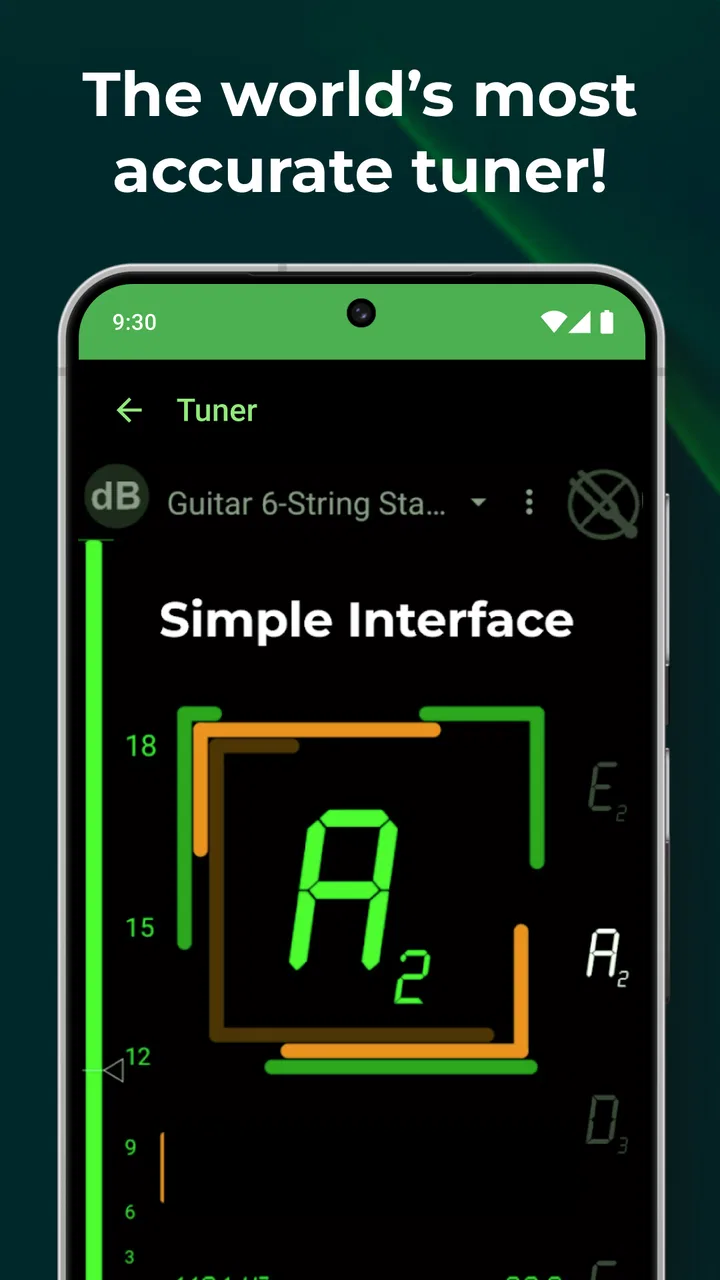
- Clear pitch display is readable while playing.
- Metronome includes flexible tempo settings for practice.
- Lightweight app uses little storage and battery.
Cons
- Some advanced features may require an in-app purchase.
- Ads can be distracting in the free version.
- Accuracy may vary with background noise or poor microphones.
- The interface may feel crowded for first-time users.
- Frequent players may prefer a dedicated hardware tuner.

DaTuner: Tuner & Metronome
Gallery